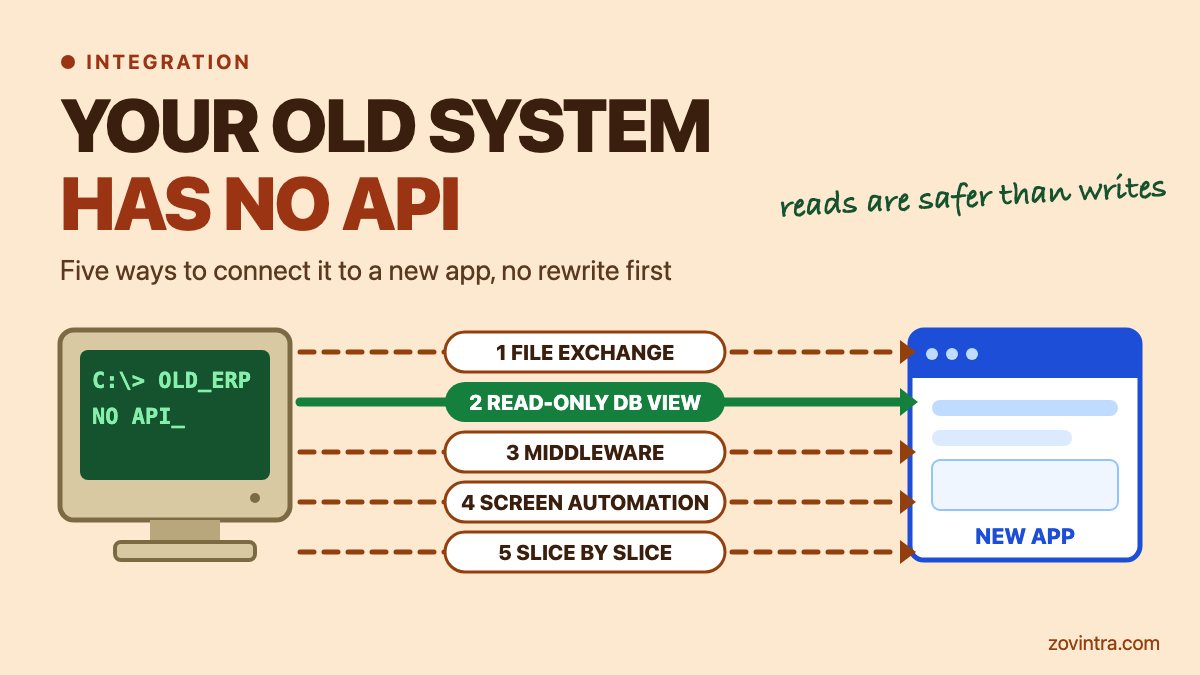
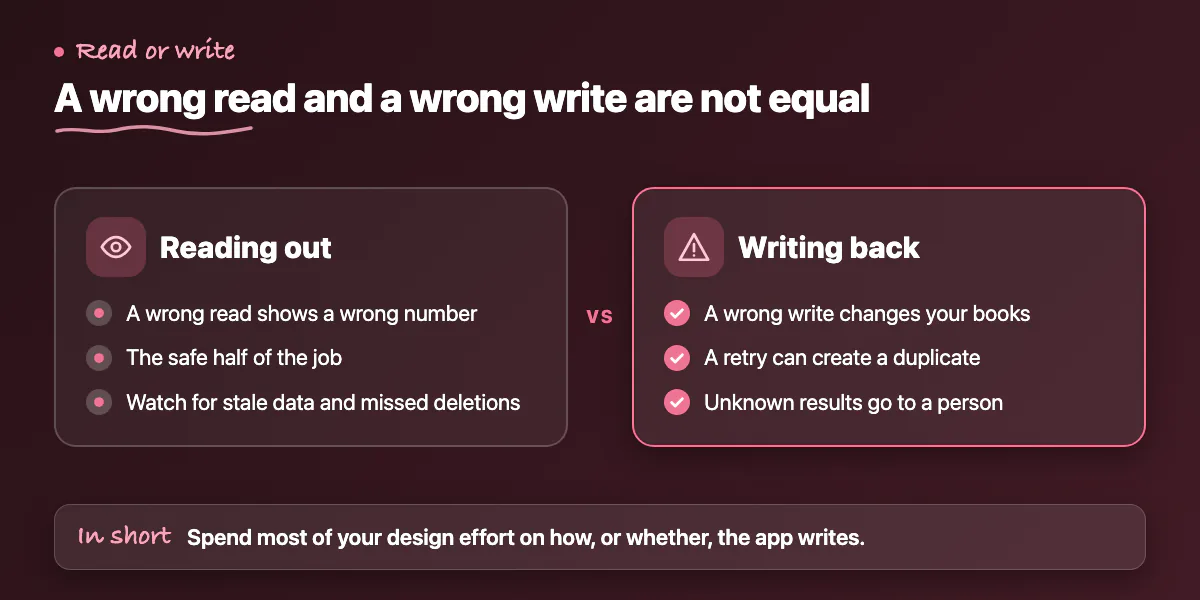
You can connect an old system that has no API (application programming interface) to a new web or mobile app in five ways: supported file exchange, read-only database access, middleware, screen automation, or replacing the old system one slice at a time. Start with the least invasive route that gives you fresh enough data. Reading data out of the old system is the safe half. Writing data back in is where live records get damaged, so most of your design effort belongs there.
This post draws on Microsoft's page on the Strangler Fig pattern, last updated on 16 October 2026, and on an integration guide from Wavect, a software service provider, published on 29 September 2026. Both describe the same routes and the same warning about writes. The advice on choosing is general engineering practice.
What can your old system already hand over?
Before you design anything, find out what the system can already do. Many old systems have no API but still offer a scheduled report that saves to CSV (comma-separated values) or XML, a bulk import tool, or a documented reporting view in the database. Ask the vendor, or whoever administers the system, five questions, and get the answers in writing.
- Which export formats exist, and can they run on a schedule?
- Is there a supported import that creates or updates records, and is it documented?
- If an import fails halfway, what state is the data left in?
- Is direct database access allowed under your support agreement, and with which account?
- Who supports this route if the vendor stops supporting the product?
The third question matters most. Wavect says that for a document with many lines you must check whether a failed import can leave partial state. If nobody can answer, treat the import as untested.
Which five routes can you use?
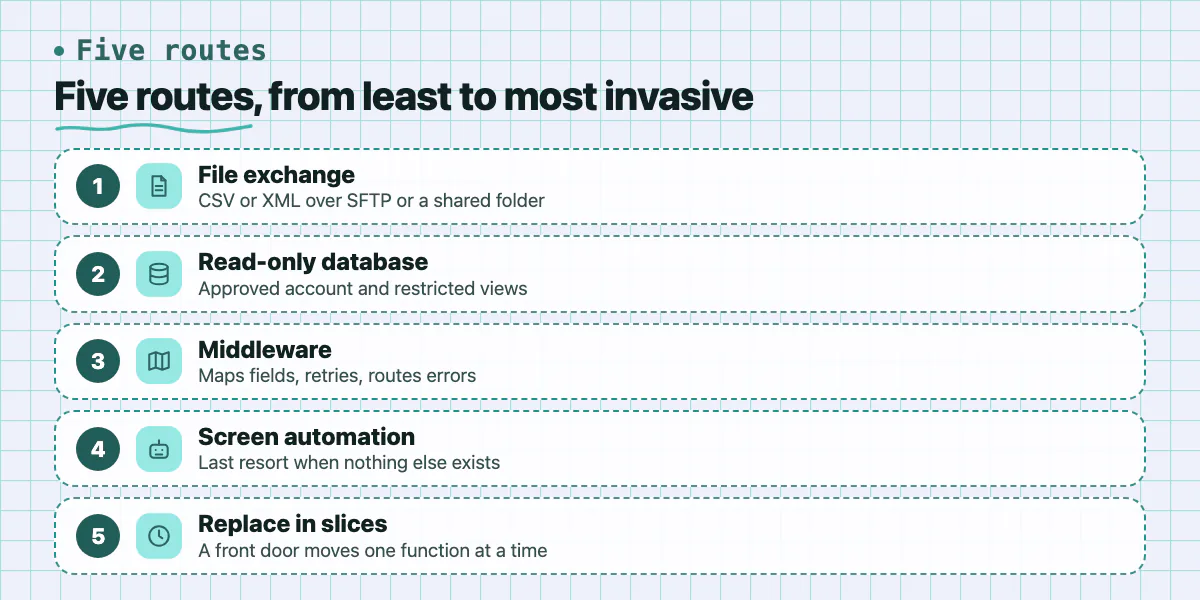
Each route trades safety, freshness and effort differently. Here they are, roughly from least to most invasive, with the main risk of each.
- File exchange. The old system exports or imports CSV or XML files, and a small job moves them over SFTP (secure file transfer protocol) or a shared folder. A 2022 post from Prismatic, which sells an integration platform, lists file transfer as a standard way to link systems without an API. It suits batch work. The limit is freshness: your data is only as new as the last file. Wavect adds that the batch timing must fit the business operation, and that a consumer must never process an unfinished upload.
- Read-only database access. The new app, or a reporting copy of the data, reads from the old system's database through an approved account and restricted views. Prismatic's post warns that direct database connections carry risk and suggests restricted views and read replicas so production is not overloaded. Wavect warns that a modified-date column does not prove you will catch deletions or late corrections. On SQL Server, Microsoft's documentation says the NOLOCK hint allows dirty reads, which can show data that was never committed or make users see records twice, or not at all.
- Middleware. A small service, or an integration platform, sits between the two systems. It maps fields, retries failed messages and sends errors to a person. Microsoft calls an adapter like this an anti-corruption layer: it translates between the two systems so the new app does not have to copy the old one's data model. Wavect is clear that middleware does not create a way to write into the old system. It only moves data over a route that already exists.
- Screen automation. Robotic process automation (RPA) tools click and type in the old screens the way a person would. Use it only when no other route exists. Wavect notes that selectors break when layouts change, and that a flow that works while a developer watches is not enough evidence that it will work unattended overnight.
- Replacement in slices. Microsoft's Strangler Fig pattern puts a front door, a proxy, in front of both systems. At first it sends most requests to the old system. You move one function at a time to the new system, and when nothing depends on the old one you switch it off. Microsoft says the pattern may not suit cases where requests to the old system cannot be intercepted, where you cannot reach its source code and it has no other integration point you can change, where the system is small and simple to replace, or where it must be retired quickly.
The trap in route five is shared data. While both systems run, both may read and write the same tables. Microsoft tells teams to plan for data stores that both systems use, and Wavect says you must decide explicitly which system is the authority for each record. Decide per record type, and never let two systems edit the same field. When you do move a slice of data to a new database, treat it like any schema change: our guide to safe Postgres migrations for small teams covers rollback, review and backfill.
If the new app will have web and mobile clients, give them one front door of their own as well. Our post on one versioned API for web, iOS and Android explains why.
Why are writes the risky part?
A wrong read shows a wrong number on a screen. A wrong write changes your books. Three failures come up again and again.
- Skipping the application. In many old systems, rules such as stock totals or approval steps live in the application code, not in the database (general experience, not from the sources). Writing straight into tables skips those rules. Wavect's advice is blunt: do not turn a read-only proposal into undocumented writes to the ERP (enterprise resource planning) transaction tables. Use the documented importer or do not write.
- Duplicates on retry. The connection drops after the old system saved a record but before your app heard back. Your app tries again, and now there are two invoices. Stripe's API documentation shows the usual cure: an idempotency key, a unique ID sent with each request so the receiver can recognise a repeat and not do the work twice. An old system with no API will not check keys for you, so your own glue has to look the record up before it resends. Wavect adds that a middleware log alone cannot guarantee a write happens exactly once, because a crash can come after the commit and before the log entry.
- False status. Do not show a record as synced because a file was uploaded or a job was queued. Wavect lists this as a risk. Show sent until the old system confirms.
A practical rule, from general engineering practice: the new app keeps its own record of every request with a clear state, such as queued, sent, confirmed or unknown. Anything stuck in unknown goes to a person, not to an automatic retry. Wavect gives the same advice for screen automation: if an unknown result cannot be resolved safely, unattended submission should stop.
How do you choose? A decision list
Answer these seven questions before you pick a route. They are general practice, not a formula.
- What is the worst outcome if one record is wrong, and can you undo it?
- How fresh must the data be: seconds, hours, or next morning?
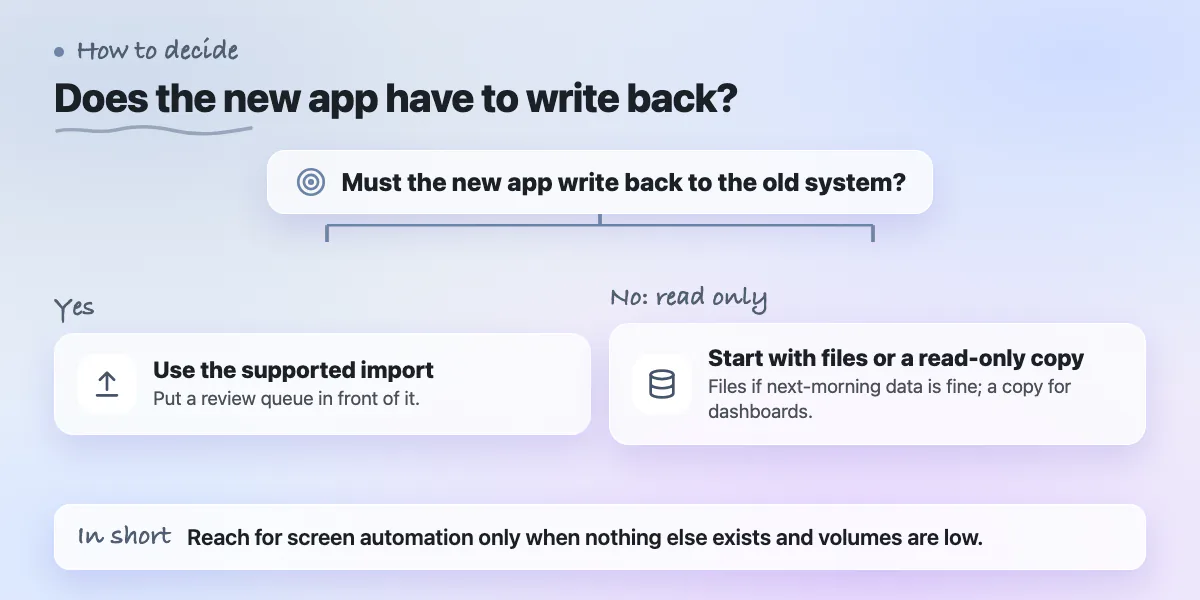
- Does the new app only read, or must it write back?
- Does the vendor support this route, and is that in writing?
- Can you test on a copy of the system rather than the live one?
- How will you notice a lost or duplicated message, and who gets the alert?
- Who maintains the glue in a year, and is it documented?
A rough mapping follows. If next-morning data is fine, start with files. If you only need dashboards, a read-only copy of the data is enough. If the new app must write, use the supported import and put a review queue in front of it. Reach for screen automation only when nothing else exists and volumes are low. Plan replacement in slices when the old system is near the end of its life. Whoever builds the glue will own it for years, so insist on handover notes: our developer handover checklist lists what to ask for.
When this does not apply
Skip these routes if any of the following is true.
- The system has an API after all. Ask the vendor first. A newer version or an add-on may offer one.
- The system is small and simple. Microsoft notes the Strangler Fig pattern may not suit a small system that is simple to replace. If replacing it is simple, replace it. Our posts on build or buy and custom software versus off-the-shelf cover that choice.
- You need to switch the old system off quickly. Microsoft lists a need to fully decommission the original solution quickly as a case where the pattern may not suit.
- You need answers in seconds. File exchange and scheduled extracts are batch routes. If you need live updates, the real question may be replacement.
- You cannot change anything: no source, no database access, no import. Microsoft says the Strangler Fig pattern may not work when you cannot reach the source code and have no other integration point to change.
Want a second opinion on your options?
If you have an old ERP, desktop or vendor system and a new app to connect, we can review what the system exports, which of the five routes are open to you, and where writes would be risky, before anyone writes code. You can ask for an integration options review on our custom software page or contact us.
Common questions
Can you integrate an ERP that has no API?
Usually, yes. File exchange, read-only database access, middleware and screen automation all work without an API, if your vendor and support terms allow them. Reading data is far safer than writing it. Write only through a documented import, never by editing tables directly, and test on a copy first.
Is screen automation a good way to connect old software?
It is a last resort. It breaks when screen layouts change, and a flow that works while someone watches may fail overnight. Wavect says an unknown result should stop unattended submission. Use it only when no file, database or import route exists, keep volumes low, and have a person handle every unknown result.
When does the Strangler Fig pattern not fit?
Microsoft says it may not suit cases where requests to the old system cannot be intercepted, where you cannot reach its source code and have no other integration point to change, where the system is small and simple to replace, or where you must fully decommission the original quickly.
Sources
- Strangler Fig pattern
- Legacy ERP integration without an API
- API-less integrations
- Table hints (Transact-SQL)
- Idempotent requests
Building something similar?
Talk to our engineering team about your architecture, roadmap, and delivery timeline.
Request a Technical Review →
We design, engineer, and deploy high-performance web platforms, mobile applications, and intelligent cloud systems.