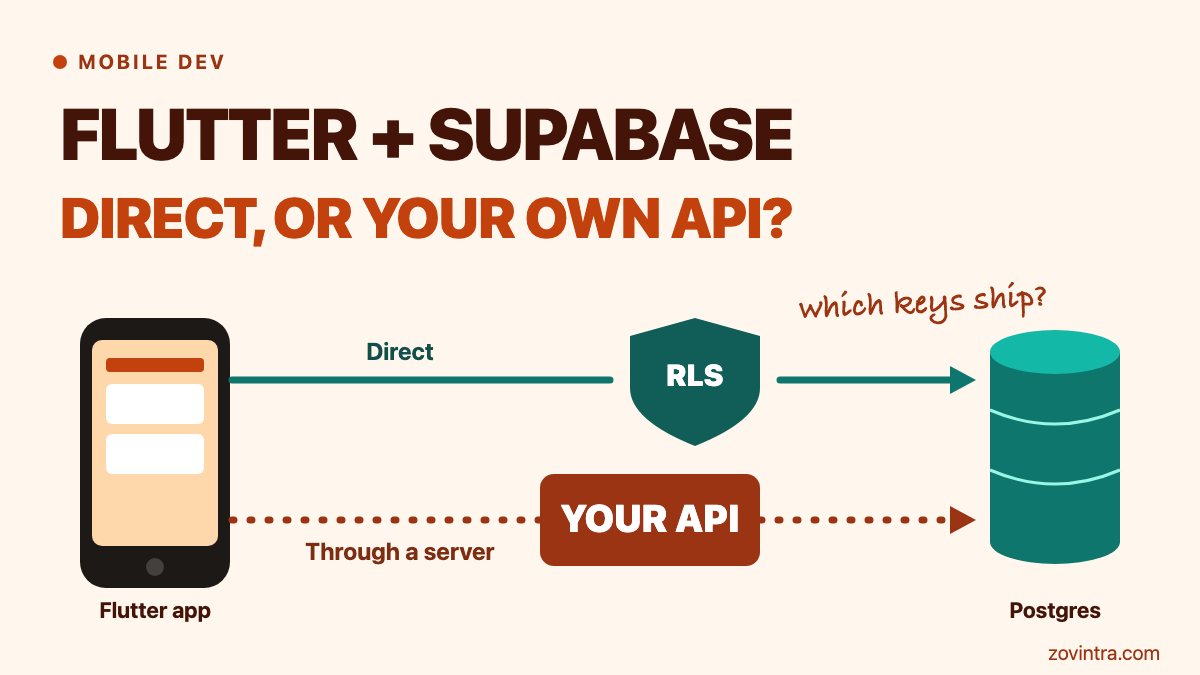
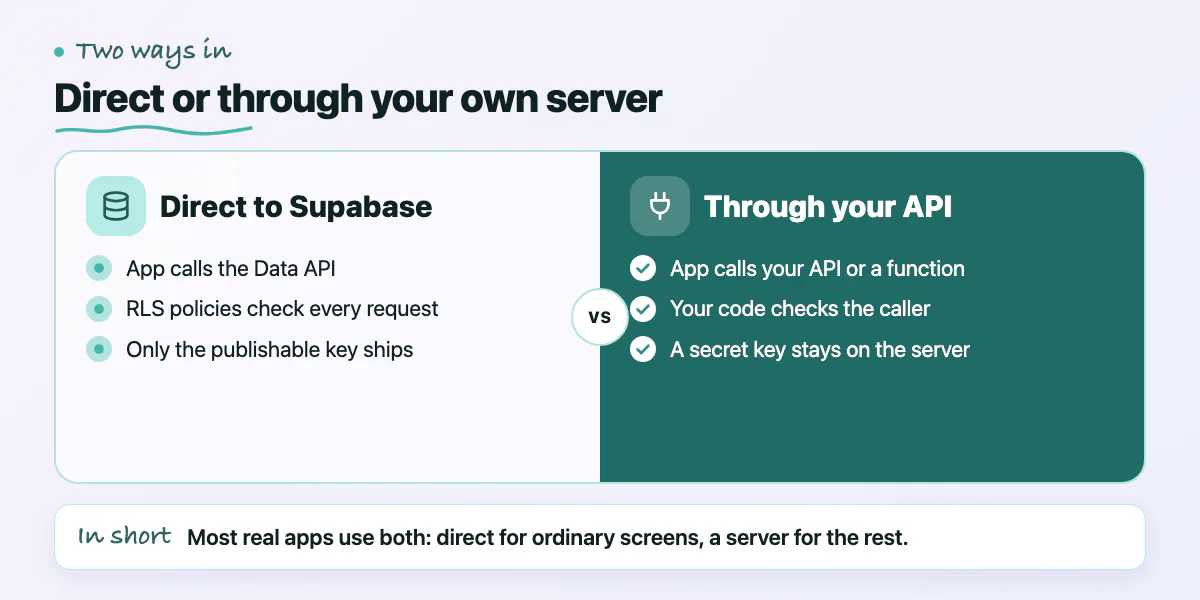
Call Supabase directly from your Flutter app when the data is simple, each row belongs to one user, and you have tested the row-level security (RLS) policies that guard it. Add your own API or a Supabase Edge Function when an action needs a secret, a payment, a rule that spans several tables, or a limit on how often it runs. Most real apps use both: direct reads and writes for ordinary screens, and a thin server layer for the few actions that must not trust the phone. Cobalt, a security testing firm, published a pentester's view of Supabase on 30 October 2026. Its list of risks lines up closely with this choice.
What are the two architectures?
In the direct model, the app uses the supabase_flutter client. The client calls Supabase's automatic Data API with a publishable key and the signed-in user's session token, and Postgres checks RLS policies on every request. In the server model, the app calls your API or an Edge Function. That code decides who the caller is, applies your rules, and then talks to the database, often with a secret key that skips RLS.
Supabase's own guidance describes both. Use the Data API with RLS when the frontend reads and writes data directly, and use a custom backend when you need server-side logic or when credentials must stay hidden (Supabase docs). In our own operations tool, ManOps, the Flutter apps go through a versioned API instead of the database. We wrote up why in one versioned API for web, iOS and Android, and the product is on our ManOps page.
What does row-level security protect, and when is direct access enough?
RLS decides which rows a given user may read or change. Once you switch it on, no data is reachable through the API with a publishable key until you add policies. That is a safe default, and also the reason a careless policy hurts. A policy written as `to anon using (true)` shows the rows to every signed-out visitor. Views skip RLS by default, so on Postgres 15 and later set `security_invoker = true`. Functions are not covered by RLS at all, so a `security definer` function needs its own review (Supabase docs).
Cobalt (a security vendor's blog, so expert opinion) says to treat RLS as the main defence and test it like any other access control. An empty response proves nothing, because the table may be empty or the filter wrong, so test with known records for different users (Cobalt).
What RLS does not do is act. It will not call Stripe, verify a payment, send a push notification, limit how often a user can run an action, or run a five-step business rule in a readable way. That limit is general engineering practice, not a Supabase flaw. For a deeper look at policy mistakes, see six policy mistakes that leave Supabase data public.
Direct access is enough when all of these are true:
- Each row belongs to one user, or to a group with a simple membership rule.
- Every table in an exposed schema has RLS on and only the grants each role needs.
- Nothing in the action needs a secret key or a third-party credential.
- A user editing their own row is acceptable. Notes, settings, drafts, saved items and similar screens fit.
- You have tested the policies with at least two real users.
Keep one fact in mind. The publishable key is built to ship in an app, and Supabase says mobile apps are always public, so the key can be extracted. Anyone can take that key and call the Data API without your app. Your policies are the only thing between that person and your data, so the app's own checks do not count.
When should you add Edge Functions or your own API?
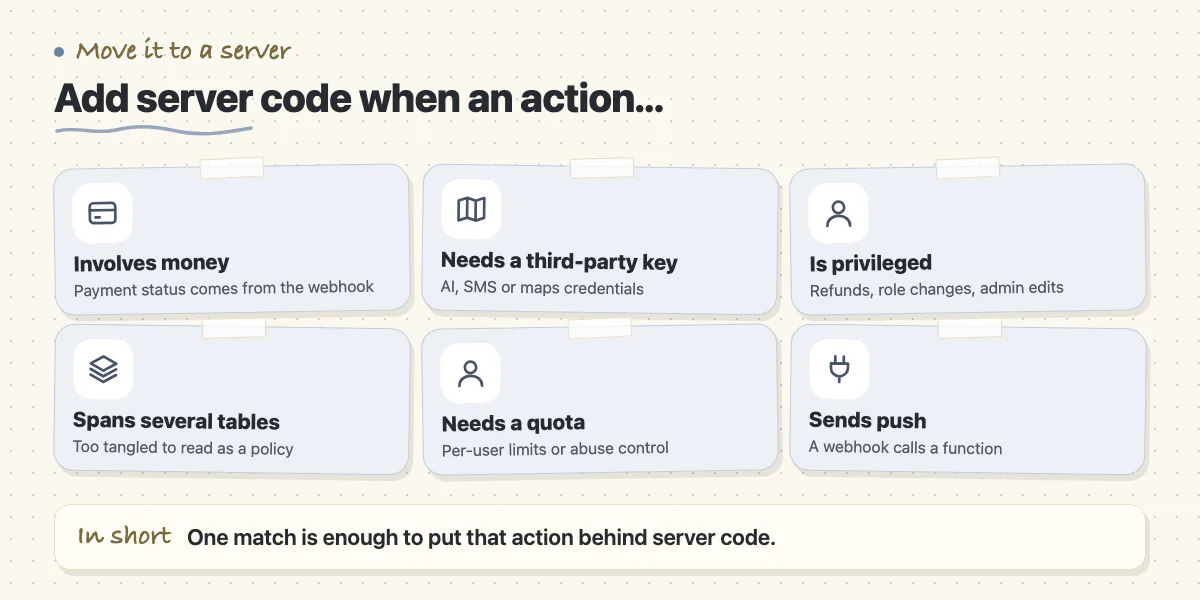
Move an action behind server code when any of these is true:
- It involves money. Supabase lists webhook receivers such as Stripe as a typical Edge Function use. A payment status should come from the provider's webhook, never from the app saying it was paid.
- It needs a third-party key, such as an AI provider, an SMS gateway or a maps server key.
- It is a privileged action: refunds, role changes, admin edits, deleting another user's content.
- The rule spans several tables or steps and would be unreadable as a policy.
- It needs a per-user quota or abuse control. Supabase shows a pre-request hook for the Data API, but a function is usually simpler to reason about (our view, general practice).
- It sends push notifications. Supabase's own example has a database webhook call an Edge Function, which then calls Firebase Cloud Messaging (Supabase guide).
Server code brings its own risk. Cobalt flags Edge Functions that use elevated privileges and that trust input because the frontend sent it. Supabase's docs make the same point: a handler that uses the admin client, which bypasses RLS, and reads a shared table without filtering by the caller returns every user's rows. The docs advise keeping JWT verification on for user-facing functions. Check who is calling, use a client scoped to that user where you can, and filter by the caller when you cannot.
Edge Functions suit short, repeatable jobs. They are TypeScript functions on a Deno-compatible runtime, and the docs warn about cold starts and advise short-lived, idempotent functions, with heavy jobs moved to background workers (Supabase docs). Choose your own API when you already run a backend, when web, iOS and Android share the same rules, or when jobs run long. For the wider backend choice, see Firebase or Supabase for a new app.
Which keys can ship inside a mobile app?
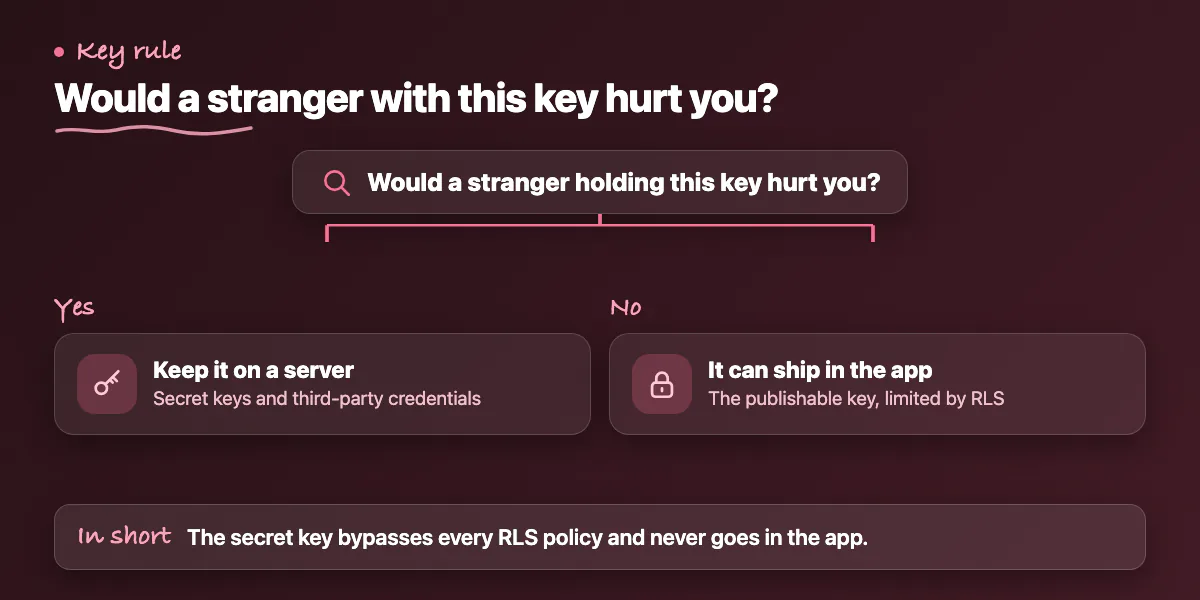
Supabase's current key model is simple. The publishable key (`sb_publishable_...`) is for code you ship, and it only reaches what RLS allows. The secret key (`sb_secret_...`) is for servers and Edge Functions, and it bypasses every RLS policy you have. The docs say it must never appear in source code or a bundled mobile package.
Legacy `anon` and `service_role` keys are on their way out. Supabase plans to deprecate them by the end of 2026, and creating new keys does not switch the old ones off (Supabase docs). The Flutter setup call now takes a `publishableKey` and still accepts the deprecated `anonKey` (Supabase Dart reference). Our guide to migrating and rotating legacy keys walks through the steps.
Do not count on obfuscation to hide anything. Flutter's own page says obfuscation only renames symbols, does not encrypt resources, and that storing secrets in an app is poor practice. Cobalt's article on testing Flutter apps (a security vendor's blog) reports that running `strings` on the compiled library can reveal endpoints and keys, and that assets can hold secrets too (Cobalt). Simple rule: if a stranger holding the key would hurt you, keep it on a server.
What changes on mobile: old app versions, realtime and storage?
A web page updates when you deploy. A phone app does not: users can run a build that is weeks old. With direct access, your table and column names are the contract with every installed build. Renaming a column can break old apps overnight. This part is general practice, not a Supabase rule. Add columns before you remove them, and keep old shapes working until old builds fade. Supabase suggests putting exposed objects in a dedicated schema such as `api` and keeping internal tables in an unexposed one (Supabase docs). That gives you room to change the inside without changing what apps see. A server API gives you another option: it can refuse builds below a minimum version.
- Realtime. Postgres Changes only reach clients allowed to read the rows under RLS. Broadcast and Presence are controlled by policies on `realtime.messages`, and clients must join private channels. Permissions are cached per connection, so a revoked user keeps receiving messages until the token refreshes. Keep token lifetimes short (Supabase docs).
- Storage. Uploads are blocked until a policy allows them, and objects in a public bucket are public (Supabase docs). Cobalt notes that a bucket that blocks listing can still leak files when names are predictable.
How do you decide, and how do you test it?
Start with the decision. Go direct if every item in the earlier checklist holds. Add a server layer for each action that fails one. A mixed design is normal and often the safest. Then test, using this list of general practice built on Cobalt's authorization matrix idea:
- Write an authorization matrix: who can read, write, subscribe or upload across tables, buckets, realtime channels and functions.
- Test with two real users and known records. User A must not read, change or delete user B's rows.
- Call the API with only the publishable key and no sign-in. How to test Supabase data with the anon key shows how.
- Search a release build for `sb_secret_`, `service_role` and any third-party keys.
- Read every Edge Function: does it check the caller, and does it filter by the caller when it uses an elevated client?
- Review views, `security definer` functions, storage policies and realtime channels.
- Run an older app build against the new schema before every release.
When does this advice not apply?
Some apps can ignore part of this. A read-only app with public content, such as a menu or an event list, can use an intentional `to anon` read policy. If your team already runs a backend that owns all data and you use Supabase only as hosted Postgres, you can turn off the Data API, which Supabase says is possible when the app reaches data only through Edge Functions or direct connections (Supabase docs). A prototype can start direct and add a server layer when the first payment or admin action arrives. Write the RLS policies with the first table, though.
Want a second opinion on your Flutter and Supabase design?
An architecture and security review looks at your policies, keys, functions and old-version risk, whether you are about to choose or have already shipped. You can read about our Flutter and mobile app work or contact us with a short description of your app.
Common questions
Is it safe to put the Supabase publishable key in a Flutter app?
Yes, that is what the key is for. Supabase says publishable keys are safe in mobile apps because RLS controls what they can reach. The key can be extracted from the app, so safety depends entirely on your policies and grants. The secret key is different and must never be shipped inside an app.
Do I need my own API if I use Supabase?
Not always. For simple per-user data, direct access with tested RLS is a normal setup. You need server code for payments, third-party keys, privileged actions, cross-table rules and quotas. That code can be Edge Functions or your own API. Many apps run both.
Can someone pull a secret out of a Flutter app?
Yes. Flutter compiles to native code, but strings such as endpoints and keys can often be read from the build. Flutter's docs say obfuscation only renames symbols and does not protect resources, and that secrets in an app are poor practice. Keep secret keys and third-party credentials on a server.
Sources
- Supabase From a Pentester's Perspective
- Understanding API keys
- Row Level Security
- Securing your data
- Securing your API
- Edge Functions auth
- Edge Functions overview
- Push notifications example
- Realtime authorization
- Storage access control
- Initializing the Dart client
- Obfuscating Dart code
- Hacking Flutter apps
Building something similar?
Talk to our engineering team about your architecture, roadmap, and delivery timeline.
Request a Technical Review →
We design, engineer, and deploy high-performance web platforms, mobile applications, and intelligent cloud systems.