Supabase says its legacy anon and service_role API keys are deprecated by the end of 2026, but it has published no switch-off date. The replacements are publishable keys and secret keys. Both systems work side by side today, so nothing breaks until you or Supabase switch the old keys off. The job is to move every caller to the new keys, check that nothing still uses the old ones, and only then turn them off.
Is Supabase really removing the anon and service_role keys?
Supabase says it is deprecating them. The API keys page states that the anon and service_role keys are deprecated by the end of 2026. Neither that page nor the migration guide gives a specific day when the legacy keys stop working.
The original 2024 announcement lists "late 2026" as the time legacy keys will be deleted, marked as to be confirmed. Treat that as a planning date, not a promise. The safe plan is to finish before the year ends and not wait for a notice.
What are publishable and secret keys?
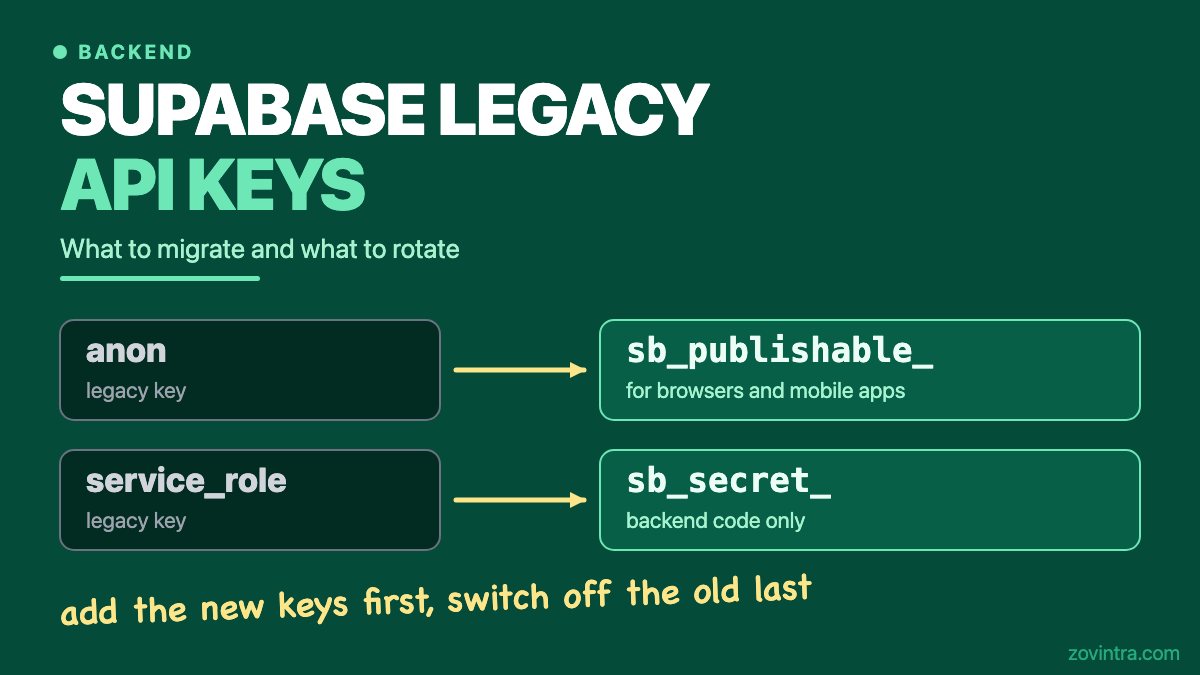
A publishable key starts with sb_publishable_. It replaces the anon key. It is low privilege and is meant for browsers, mobile apps and other public code. Row Level Security (RLS) still decides what it can read.
A secret key starts with sb_secret_. It replaces service_role. It maps to the service_role Postgres role and bypasses RLS, so it belongs only in backend code you control. Supabase says a secret key returns HTTP 401 in a browser, but also warns that an attacker can still use a leaked key from other tools.
One more difference matters later. Publishable and secret keys are short strings, not JSON Web Tokens (JWTs). The legacy keys are long-lived JWTs, and a long key starting with eyJ is a legacy key.
What is the safe order to migrate?
Supabase's migration guide gives the order in six steps. We list its webhook note as a separate step. Creating new keys does not revoke the old ones, so you can move one caller at a time.
- Create the new keys in Settings, API Keys, on the publishable and secret keys tab.
- Swap the publishable key into public code: the browser app, mobile apps and any CLI you ship.
- Swap the secret key into backend code you control.
- Update Database Webhooks and pg_net calls. Send the secret key in the apikey header, not Authorization: Bearer, and keep it in Vault rather than hardcoding it.
- Update Edge Functions (see the next section).
- Check that nothing still uses a legacy key. The guide says there is no automatic usage indicator, so this check is manual.
- Deactivate the legacy keys in Settings, API Keys. The guide says this is reversible.
Step 6 is where migrations go wrong. The guide's audit list: old mobile app versions already in users' hands, CI/CD pipelines, third-party integrations and webhooks, cron jobs and workers, and pg_net or Database Webhook calls. The guide gives no advice on forcing users of old app versions to update.
What is the Edge Function verify_jwt trap?
By default an Edge Function has verify_jwt = true, so the platform checks a JWT before your code runs. The new keys are not JWTs. The migration guide says the built-in check only understands legacy JWT-based keys. It also says sending a new key as Authorization: Bearer can cause an Invalid JWT rejection. Send it in the apikey header.
The migration guide itself says to set verify_jwt = false for functions called with the new keys, and to authorize the caller in code. The trap is doing the first without the second. Supabase's Edge Function auth page warns that turning it off to clear a 401 during development removes the platform's check. The API keys page adds that verify_jwt alone does not authenticate a caller that sends only an API key.
So if you turn it off, you must check the caller in your function code. Supabase recommends its @supabase/server SDK for this. Test the function with no key, with a wrong key and with a publishable key. Only the caller you intend should get through.
A smaller change: if you build the client yourself inside a function, read SUPABASE_SECRET_KEYS instead of the legacy SUPABASE_SERVICE_ROLE_KEY. Reading the legacy variable keeps you on the deprecated path.
What do I need to rotate?
Migrating is not the same as rotating. Moving to new keys does not, by itself, make an old leaked key safe. Rotate if a key was ever exposed.
- If a service_role key was ever in a frontend bundle, a public repo, a chat message or a shared document, treat it as compromised. Our post on a service role key in your frontend bundle covers the first hour.
- Supabase's leaked key guide says to fix the root cause first, create a new secret key, update every component, confirm, then retire the old key.
- For a leaked legacy service_role key, that guide says to deactivate the legacy keys, and, if you find a missed client afterwards, to move it to a new key rather than re-enable the legacy keys. It also says to revoke the legacy JWT secret, since anything that still trusts it can accept the leaked key.
- Use a separate secret key for each backend component. Then a leak means rotating one key, not all of them.
- The anon key is public by design, so exposure of it alone is not a leak. Your RLS policies are what protect the data. If you are unsure they do, our guide to RLS policy mistakes is the place to start.
There is a separate item that is easy to miss. Access tokens that Supabase Auth issues to your users are still signed by the shared JWT secret. The migration guide recommends a separate move to JWT signing keys. It is not part of the key swap.
What to do this week
When you can skip this
You can skip it if you do not use Supabase. You can also skip it if you already created the new keys, moved every caller, checked old app versions and deactivated the legacy keys. If your project is only a prototype with no real users, the move is still worth doing, but it is not urgent. While you are in the Supabase dashboard, check the Postgres version too: PostgreSQL 14 end of life.
Need a second pair of eyes?
Zovintra's Launch & Rescue work covers apps built with AI tools on Next.js, Supabase and Vercel. The free code review reads a repository read-only for committed secrets, dependencies and database security. It does not replace the migration steps above. You can also contact us. If you want to test the public side yourself first, see how to test whether your Supabase data is public.
Common questions
When do the Supabase legacy keys stop working?
Supabase says the anon and service_role keys are deprecated by the end of 2026 and has not published a specific switch-off date in the pages we read. Both key types work together until you deactivate the legacy ones, so plan to finish before the year ends.
Do I have to rotate my keys when I migrate?
No. Migration adds new keys alongside the old ones. You rotate only if a key was exposed, and a leaked legacy service_role key also means deactivating the legacy keys and revoking the legacy JWT secret.
Why do my Edge Functions return 401 with the new keys?
The built-in verify_jwt check only understands legacy JWT-based keys, and new keys should be sent in the apikey header. Fix the header and authorize the caller in code. Do not just turn verify_jwt off.
Sources
- Understanding API keys
- Migrating to new API keys
- Rotate a leaked or compromised API key
- Securing Edge Functions
- Upcoming changes to Supabase API keys
Building something similar?
Talk to our engineering team about your architecture, roadmap, and delivery timeline.
Request a Technical Review →
We design, engineer, and deploy high-performance web platforms, mobile applications, and intelligent cloud systems.