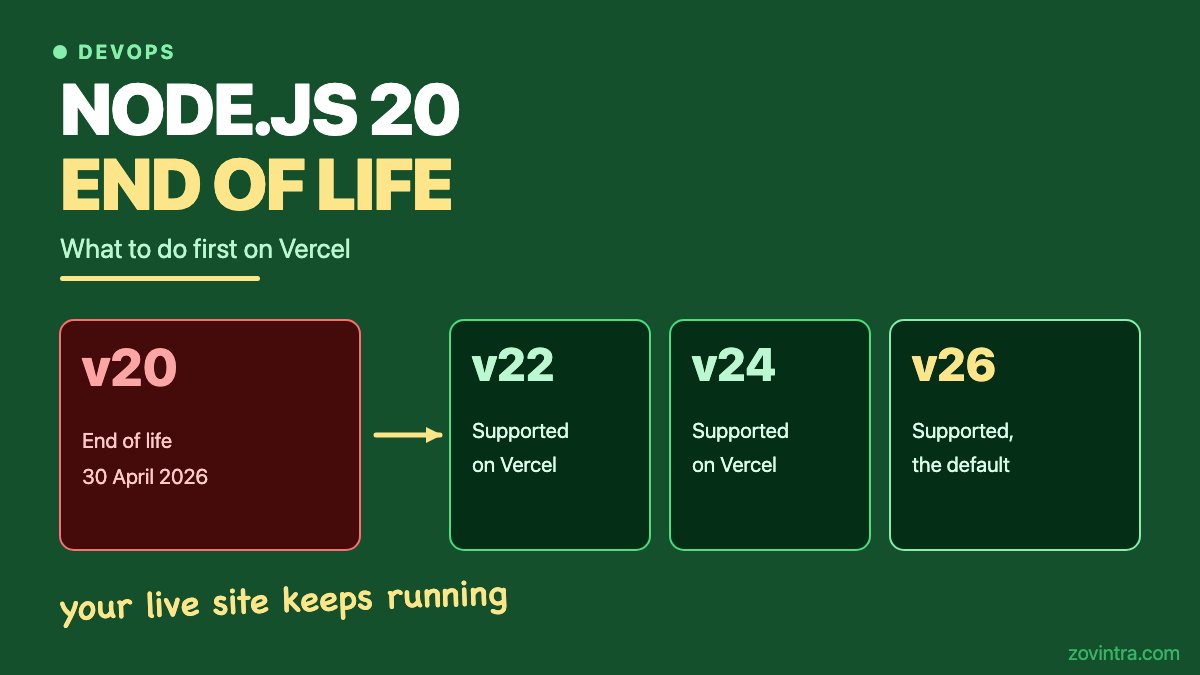
Node.js 20 is end of life, and Vercel's notice says new deployments using it error from 1 October 2026. Your live site keeps running. Your next deployment is the one that can fail. Node.js 20 reached end of life on 30 April 2026. The fix is to move to a newer Node.js line, test, and redeploy.
Is my live site going to stop working?
No. Vercel's changelog notice, published on 14 July 2026, says deployments that already exist are not affected. Functions you have already deployed keep working, and invocations continue.
The change hits new deployments. The notice says projects still using Node.js 20 for Functions will see an error when a new deployment is created, and that Node.js 20 is disabled in Project Settings from 1 October 2026. So the first sign is usually a failed deploy after a small code change, not an outage.
What does end of life mean for Node.js 20?
The Node.js release schedule lists 30 April 2026 as the end-of-life date for v20. The Node.js end-of-life page says versions past end of life no longer receive updates, including security patches.
That is the real risk. A site on an end-of-life runtime still works, but any new flaw found in that runtime will not be fixed for you. Vercel's own notice says that if you run Node.js 20 in a container, you manage the Node.js version and its security updates yourself.
Which Node.js version should I move to?
Vercel's supported versions page lists 26.x (the default), 24.x and 22.x. Only major versions are available. Vercel applies minor and patch updates itself.
The Node.js previous releases page marks v26, v24 and v22 as LTS, which stands for long-term support. It marks v20 as end of life and v27 as Alpha. That page says production apps should use only Active or Maintenance LTS releases. It does not say which phase each line is in, so we read the dates from the release schedule it links to.
- v22: end of life 30 April 2027. Maintenance LTS start date on the schedule: 21 October 2025.
- v24: end of life 30 April 2028. Maintenance LTS start date on the schedule: 20 October 2026.
- v26: released 5 May 2026. Active LTS start date on the schedule: 28 October 2026. End of life 30 April 2029.
The schedule page says its dates are subject to change. Our view: move to 24 or 26 if you can. Node 22 works as a short stop, but it has the least time left. Vercel's own upgrade example uses 24.x, which is a safe middle choice if your packages have not been tested on 26 yet.
How do I change the Node.js version on Vercel?
There are two ways. Per Vercel's docs, set it in the dashboard: open your project, go to Settings, then Build and Deployment, find the Node.js Version section and pick a version. This applies to new deployments.
Or set the major version in the engines field of package.json, for example "node": "24.x". This overrides the dashboard value.
Watch one detail. Vercel's Node.js 26 notice says that if your engines.node range allows 26, for example >=20, your next deployment uses Node.js 26. A loose range can move you to a new major version without you choosing it. Pin a range like 24.x so the upgrade is a decision.
To find affected projects across a team, Vercel's notice suggests installing the latest CLI with npm i -g vercel@latest and running vercel project ls --update-required.
What should I test before I deploy?
Test on a preview deployment first, not on production. Our guide to launching without downtime on Vercel covers rollback, which is worth having ready.
- Match your local version. Update .nvmrc or .node-version and your CI config so every environment runs the same Node.js major version.
- Reinstall from a clean state and run your tests. Packages with native parts, such as image or hashing libraries, are the usual source of new errors.
- Run the production build and open the main pages on the preview URL.
- Check the real version. Run node -v in the Build Command and log process.version inside one function, as Vercel's docs suggest.
- Exercise anything that calls another API from a function. Vercel's Node.js 26 notice says built-in fetch uses HTTP/2 by default there. To keep HTTP/1.1 in Functions, set VERCEL_FETCH_DISABLE_H2 to 1 and redeploy.
- Check your environment variables, cron jobs and webhooks on the preview. Our post on Vercel environment variables lists the mistakes that leak data between preview and production.
- Read your framework's docs for its minimum Node.js version before you pick a line. We did not verify that for any framework here. If you run Next.js, also read Next.js security releases: which version should you run?.
If you have a CI pipeline, this is a good time to make it run on the same Node.js version as production. Our post on CI gates for a small team shows a small set of checks that earn their keep.
What if I cannot upgrade right now?
Vercel's notice describes a container option. Add a Dockerfile.vercel at the project root, and the Node.js setting in Project Settings no longer applies, so the deprecation does not block the deploy. The notice's example pins node:20-alpine.
Vercel recommends upgrading when possible. A container keeps you on an end-of-life runtime and makes you responsible for its security updates. Use it only as a short bridge.
What to do this week
When you can skip this
Skip it if every project already runs on Node.js 22, 24 or 26 and your engines range is pinned. Skip it if you host somewhere other than Vercel. This post covers only what Vercel's notice says, and we did not verify the dates for other hosts. Check your own provider's notice.
Want it handled?
Runtime upgrades are easy to postpone because nothing visibly breaks until a deploy does. If your app was built with an AI tool and nobody on your side owns the hosting setup, Zovintra's Launch & Rescue service covers this kind of upkeep alongside the rest of a code and health review. Run the free app health check or contact us to talk it through.
Common questions
Will my deployed Vercel site stop if it uses Node.js 20?
No. Vercel says existing deployments are not affected and invocations keep working. New deployments on Node.js 20 show an error, so the problem appears the next time you deploy.
Should I upgrade to Node 22, 24 or 26?
Vercel supports all three. Node 24 or 26 gives you the most time before end of life. Node 22 ends on 30 April 2027 on the release schedule, so it is a short stop.
How do I change the Node.js version on Vercel?
Open Settings, then Build and Deployment, and pick a version under Node.js Version. Or set the engines.node field in package.json, which overrides the dashboard value. Redeploy and check process.version.
Sources
- Node.js 20 is being deprecated
- Supported Node.js versions
- Node.js 26 LTS is now Generally Available on Vercel
- Node.js releases
- Node.js release schedule
- End-of-life versions
Building something similar?
Talk to our engineering team about your architecture, roadmap, and delivery timeline.
Request a Technical Review →
We design, engineer, and deploy high-performance web platforms, mobile applications, and intelligent cloud systems.