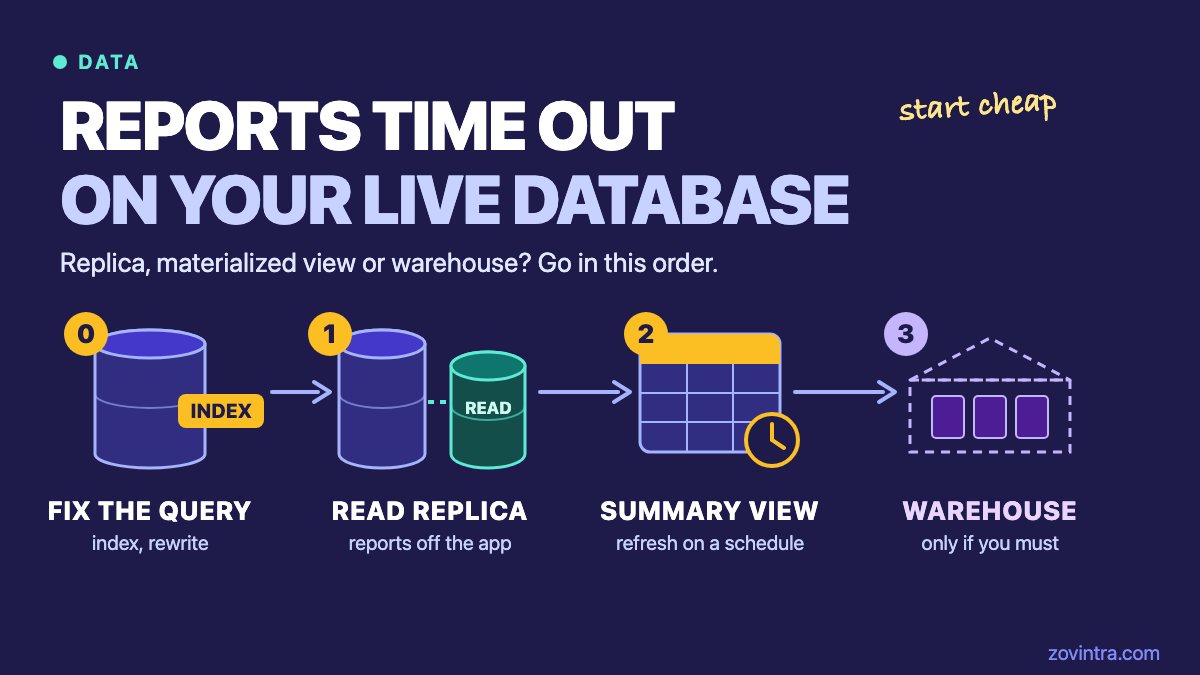
Fix the slow query first. If the app still slows down when reports run, move the reports to a read replica. If the same heavy totals are requested again and again, pre-compute them in a materialized view. Add a data warehouse only when you need history, or data from several systems, in one place. Most small teams stop at the second or third step, and each step costs more to run than the one before it.
This post explains what each step does, what it cannot do, and how to choose. Database facts come from the PostgreSQL manual. Staged advice and time estimates come from two vendors that sell analytics products, so read their numbers as rules of thumb.
Why do reports slow the app at month end, and is it the query or the load?
Two problems look the same from outside. A slow query reads far more data than it needs and takes minutes. Load means the query is acceptable alone, but competes with your customers for the same processor, memory and disk. A report that runs fine at night and drags the app at month end points to load, though a slow query makes it worse.
Tell them apart before you spend money. Postgres has a module called pg_stat_statements that records, for each distinct statement, how many times it ran and its total and mean execution time. It must be loaded at server start and enabled with CREATE EXTENSION, so check how your host switches it on. Sort by total time to see the costliest statements.
Then run EXPLAIN ANALYZE on the worst report query. The manual says this option actually executes the query, then shows true row counts and run times at each step. Run it off peak, and for a statement that changes data, wrap it in a transaction you roll back.
Look for a big table read in full to answer a narrow question, or a join on a column with no index. The planner may skip an index on a small table, so test on realistic data volumes. A new index or a rewritten query is the cheapest fix there is.
Step one: when does a read replica help, and what are its limits?
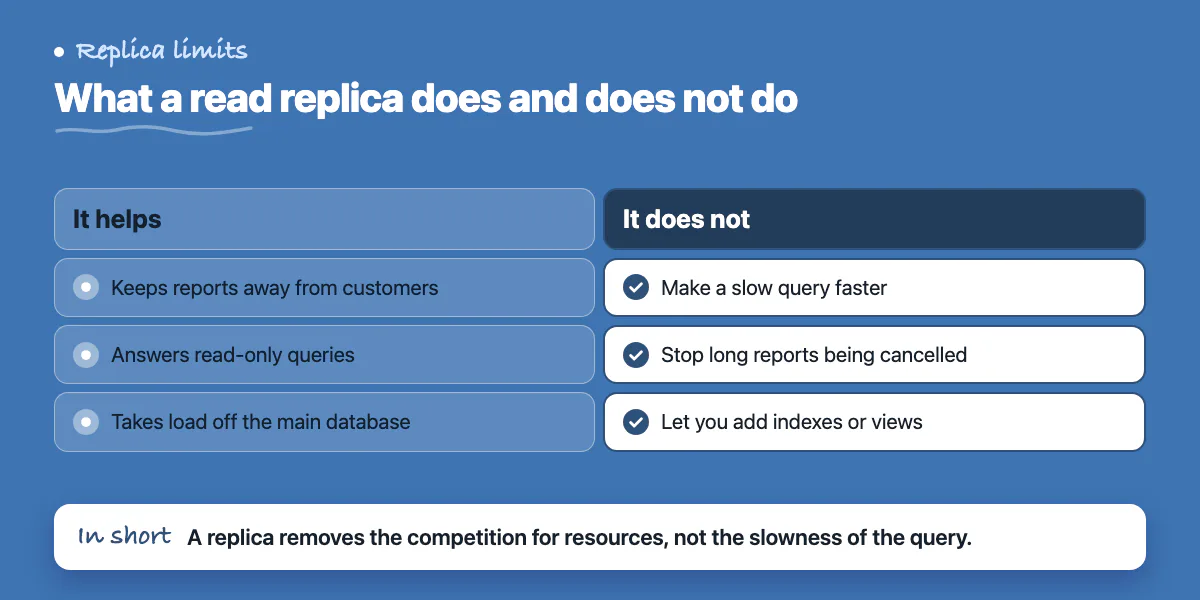
A read replica is a second copy of your database that receives every change from the main one and answers read-only queries. Point reports at it and customers stop competing with them. Basedash, which sells a business intelligence (BI) product, says in a guide from 14 May 2026 that a replica is usually the first fix and may buy six to twelve months. It calls these rules of thumb, not benchmarks.
Know these limits before you rely on one.
- It does not make a slow query faster. MotherDuck, which sells a DuckDB service, puts it this way in its guide: a replica isolates the damage but does not fix the speed. A 45-second query stays about 45 seconds on the replica.
- Long reports can be cancelled. The main server does not know what is running on the replica, so when a replayed change conflicts with a running query, the replica must either wait or cancel the query (hot standby manual). Causes include a heavy table lock on the main database, or cleanup that removes rows the report still needs. By default the replica waits 30 seconds, then cancels (setting reference).
- The fixes trade one problem for another. A longer wait lets reports finish, but the replica falls further behind, so reports show older data. The hot_standby_feedback setting, which is off by default, prevents the cleanup conflicts, but the manual warns it can bloat tables on the main database.
- You cannot build on it. Supabase's docs say you can only read from a replica. If you want an index or a materialized view for your reports, create it on the main database.
- It costs money every month. On Supabase, a replica is billed for its own compute, on the same size as the main database, plus a disk 1.25 times the size of the main one. Check how your host prices it, and see our post on running costs for small SaaS on Vercel and Supabase.
Heavy table locks from schema changes are one cause of cancelled replica queries. Our guide to safe Postgres migrations covers how to avoid them.
Step two: when do materialized views help?
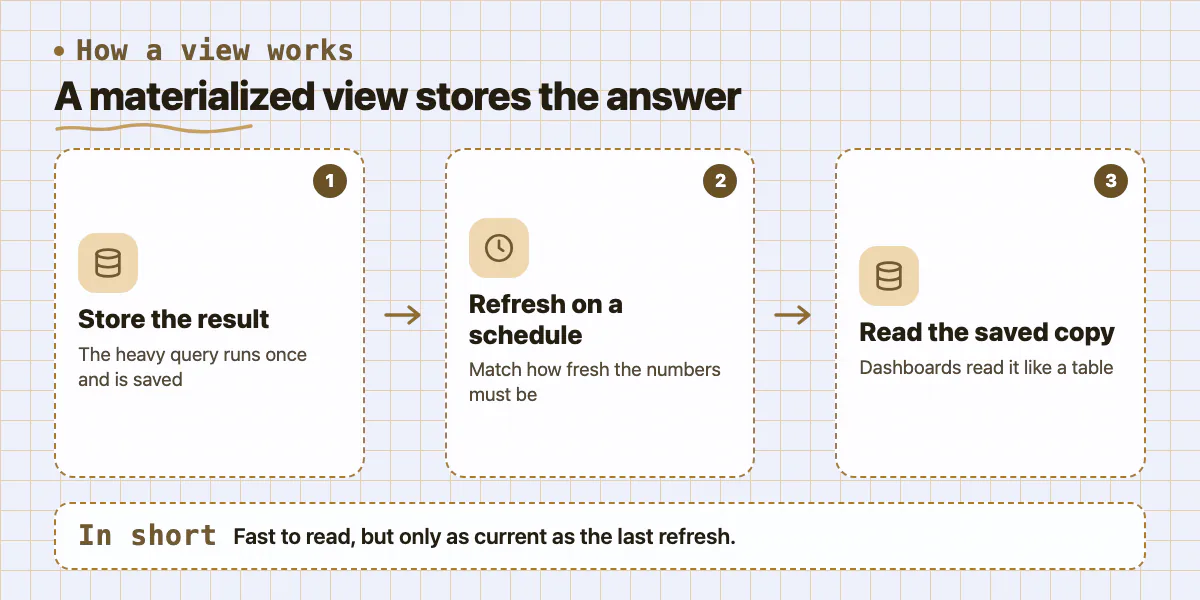
A materialized view stores the result of a query, so reading it is as quick as reading a table. The manual states the catch: the data is not always current. It changes only when you refresh the view, and its example does that overnight.
Use it when many people or dashboards ask for the same heavy summary, such as revenue by month, and an hour-old or day-old figure is acceptable. Rules that keep it working:
- Pick a refresh schedule that matches how fresh the numbers must be, and run it with cron or your host's job scheduler. Show the refresh time on the report, for example data as of 06:00.
- Plain REFRESH MATERIALIZED VIEW can block other connections that are reading the view while it runs. Adding CONCURRENTLY avoids that (refresh reference).
- CONCURRENTLY has conditions. The view needs at least one unique index that uses plain column names, covers all rows and has no WHERE clause. Only one refresh can run at a time on a view, and the view must already hold data.
- CONCURRENTLY is not always faster. The manual says a plain refresh of many changed rows tends to finish sooner and use fewer resources, while the concurrent form can be faster when few rows change. MotherDuck adds that it duplicates data during the refresh.
- Schedule refreshes away from peak hours. A refresh runs the full heavy query on the main database, so it can cause the very slowdown you are trying to remove.
MotherDuck says stopgaps like views, summary tables and replicas usually last a company six to twelve months. Neither vendor measured it, so treat that as an anecdote.
Step three: when is a separate store or warehouse justified?
A data warehouse is a separate database built for analysis. It is filled from your app database and from other tools. Basedash lists five signals that you have outgrown the production database: analytical queries that slow writes or cause lock timeouts, a need to join app data with billing, CRM or support tools, a need for history because production overwrites old rows, non-engineers who need to query data themselves, and metric definitions that drift between dashboards (guide). It suggests a warehouse when three or more apply.
The same guide says a warehouse is a poor answer to a pure performance problem, and that millions of rows, not billions, are usually fine on production. It says to start small: one or two sources, such as billing and your main database, and no dbt (a tool for managing SQL transformations) until ten to twenty SQL views have tangled together.
Which step fits you? A decision list and a worked example
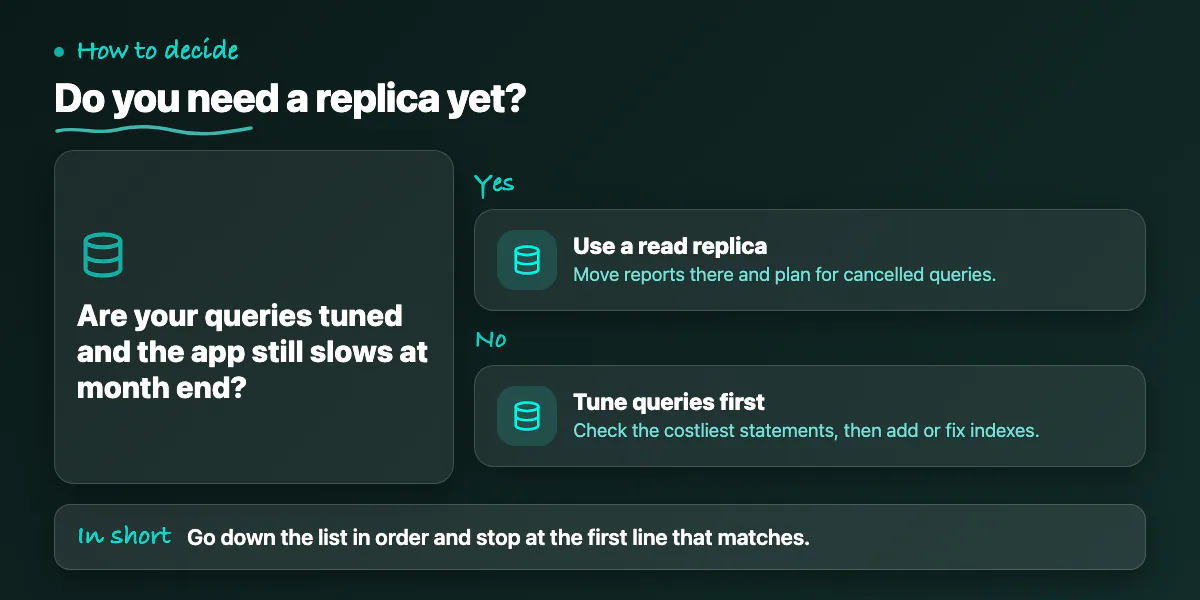
Stop at the first line that matches.
- The app slows only while a few known queries run. Tune those queries and indexes first, then measure again.
- Queries are tuned but the app still slows at month end. Move reports to a read replica, and set a rule for what happens when a report is cancelled.
- The same totals are requested again and again and a stale figure is fine. Build a materialized view on the main database and refresh it off peak.
- Reports need data from billing, CRM or support tools, or need history. Plan a small warehouse with one or two sources.
- Someone needs numbers to the second. None of these steps gives you that. It needs a different design, so talk to an engineer before buying anything.
Running costs differ by step (general engineering experience, not a measurement). Tuning costs engineer time once. A replica adds a monthly bill and lag to watch. A materialized view adds refresh jobs to monitor and a freshness question for every report. A warehouse adds a new bill, pipelines that can break, and a person who owns the metric definitions.
A made-up example, not a client result. A ten-person subscription company runs its app and its finance report on one Postgres database, and the app is slow at month end. The team lists the costliest statements, finds a report join with no index, and adds one. The report speeds up, but the app still stalls while it runs. They build a materialized view of monthly revenue by plan, refreshed nightly, with a unique index so the refresh can run concurrently. The dashboard reads the view and the app stays quick, so no replica is needed. Later finance wants revenue joined with payment-provider data and customer history. That adds Basedash's cross-system and history signals, so a small warehouse is now worth discussing.
When can you skip all of this?
- The report is slow all day, not only at peak. That is a query problem, so skip the replica and fix the query.
- The data is small. Basedash says millions of rows may not need a warehouse, and MotherDuck calls Postgres the right start for about 99 percent of startups. Both are vendor opinions.
- Nobody notices. If a weekly report runs for a minute and users are unaffected, leave it alone.
- Nobody owns the data. Basedash warns against a warehouse when no person is responsible for it.
For the wider picture on keeping an API and its database healthy as traffic grows, see scalable APIs.
Want a second opinion on your reporting setup?
If month-end reports slow your live app and you are not sure which step fits, a short review of your slowest queries and your schema usually shows whether you need an index, a view or something bigger. You can contact us or read about our custom software and backend work.
Common questions
Is a read replica enough for reporting?
Often, for a while. A replica protects customers from report load, but it does not speed up a slow query, it can lag, and long reports may be cancelled when the replica must replay changes. If reports need to be current to the second or your queries are slow, tune the queries or add a materialized view as well.
What does REFRESH MATERIALIZED VIEW CONCURRENTLY need?
It needs the view to be populated already and to have at least one unique index that uses only column names, covers all rows and has no WHERE clause. Only one refresh can run at a time on a view. In return, other sessions can keep reading the view during the refresh instead of being blocked.
When should a small company add a data warehouse?
When several signals show up together: reports that hurt production, a need to combine data from billing or CRM tools, a need for history, non-engineers who need access, and metric definitions that drift. Basedash suggests three or more. If your only problem is speed, a warehouse is probably too much. Start with the cheaper steps.
Sources
- When to add a data warehouse: signals your startup has outgrown its production database
- Outgrowing Postgres analytics
- REFRESH MATERIALIZED VIEW
- Hot standby: query conflicts
- Replication settings
- Materialized views
- pg_stat_statements
- Using EXPLAIN
- Read replicas
- Manage read replica usage
Building something similar?
Talk to our engineering team about your architecture, roadmap, and delivery timeline.
Request a Technical Review →
We design, engineer, and deploy high-performance web platforms, mobile applications, and intelligent cloud systems.